Comparison guide
Litra Glow vs. Key Light Neo: Controls and USB Power
Choose Elgato Key Light Neo if you want a front-facing dial and two saved lighting settings for video calls. Logitech Litra Glow suits a setup where you can reach rear buttons and want its adjustable monitor mount. The important differences are control access and USB power—not a proven winner for how your face looks on camera.
Quick Picks

For rear-button control
Logitech Litra Glow
— Adjustable placement with separate rear brightness and color buttons.
You need access behind the light to use its buttons.

For front controls and presets
Elgato Key Light Neo
— Front dial and two presets for returning to saved settings.
Available output depends on the USB power arrangement.
Side-by-side comparison
| Buying check | Litra Glow | Key Light Neo |
|---|---|---|
| Selected kit | Graphite single light, 946-000001 | White with monitor mount, 10LAJ9901 |
| Hardware adjustments | Rear brightness and color-temperature buttons | Front dial; two saved presets |
| Mounting detail | Height, tilt and rotation adjustment | Selected package includes monitor mount |
| USB requirement | Logitech specifies USB 3.0 | Output varies with power source; see below |
| Supplied cable | 1.5 m USB-C to USB-A | 1 m USB-C to USB-A plus 1.5 m A extension |
What changes at your desk
Reach behind, or adjust from the front

Litra Glow separates brightness and color-temperature adjustments into rear buttons. That gives you direct hardware control, but the location matters: a light tucked close to a wall can make those buttons awkward to reach. Aim the light first, then check whether your hand can comfortably reach the controls.
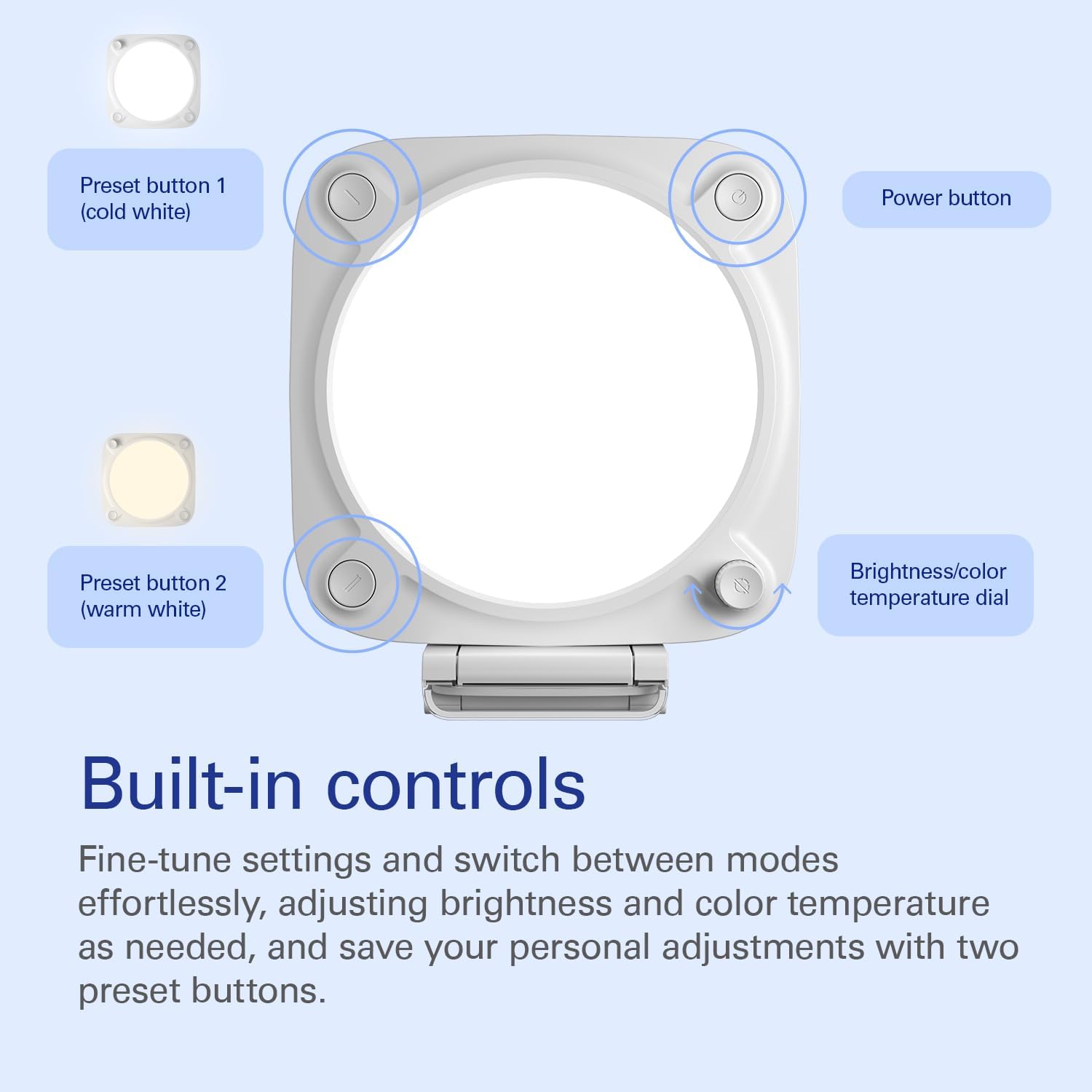
Neo puts its dial and preset buttons on the front. Press the dial to switch between brightness and color temperature. Its manual describes saving a setting by holding either preset button for three seconds. You could save separate settings for daytime and evening calls, then recall them without rebuilding each adjustment. They are your saved settings, not automatic corrections for changing room light.

Logitech documents height, tilt and rotation adjustment on Litra Glow’s mount. That helps position the light separately from a webcam. This is not a claim that Neo cannot be repositioned, or that either mount fits every monitor. Check the screen edge, camera clearance and cable route for the exact kit.
Neo’s output rating depends on its power source
Elgato lists Neo at 400 lumens with USB-A, 700 with USB-C and 1,000 with an external 3 A supply. Those are manufacturer output ratings, not measured illumination at your face. The 1,000-lumen figure is not the default for any USB connection, and an AC power supply is not included.
For USB app control, Elgato’s manual calls for a direct USB connection rather than a hub. Do not assume a monitor port or dock delivers the documented mode. Logitech specifies USB 3.0 for Litra Glow and supplies a 1.5 m C-to-A cable; that cable’s computer end is USB-A, even though the light end is USB-C.

Neo’s manual lists a 1 m C-to-A cable and 1.5 m USB-A extension. Its current product page and other package sources differ on a USB-C host adapter, so check the selected kit rather than counting on an adapter in the box. Neither light is a camera or a cordless battery lamp.
Match the controls to your calls
If you change lighting during calls and dislike reaching behind the panel, Neo’s front controls are the clearer fit. Its two presets are also a specific reason to choose it. If rear buttons are easy to reach and Litra Glow’s adjustable mount meets your placement needs, it remains a straightforward alternative. Neither choice earns a light-quality ranking from specifications alone.
The choice
Pick Neo for front adjustment and saved settings; pick Litra Glow for its documented mount adjustments and rear-button layout. Confirm the intended USB connection before ordering. Judge the final setting in your own camera preview, not a supplier’s before-and-after image.
Choose your exact version
Logitech Litra Glow
Adjustable placement with separate rear brightness and color buttons.
You need access behind the light to use its buttons.
Elgato Key Light Neo
Front dial and two presets for returning to saved settings.
Available output depends on the USB power arrangement.
How we compared
Based on matching product listings and manufacturer documentation, not hands-on lighting tests. Supplier images are unchanged; monitors and webcams pictured are not included. We have not measured brightness, glare or color accuracy.