KODAK Slide N Scan: Developed Film to JPEG, Not Paper Photos

Turn supported developed negatives and mounted slides into JPEGs. Check the film format, separate SD card and manual frame handling before choosing the 5-inch RODFS50.
Have developed negatives or mounted slides and want JPEG copies? The 5-inch KODAK Slide N Scan RODFS50 is a film-holder digitizer for that job. Choose it for supported transparent originals, with a separate SD card and hands-on frame handling. For paper photographs, choose a scanning method intended for prints instead.
Start with the original in your hand
This model accepts already-developed color or black-and-white negatives in 135 (35mm), 110 and 126 formats, plus compatible mounted transparent slides. Those numbers are film-format names, not three film widths in millimeters. Match the original to the supplied holder and correct adapter.
It cannot develop exposed film. Loose paper photos and instant prints do not belong in its film slot, and it is not a motion-picture reel-to-video converter. A box of “old photos” may contain several kinds of originals; sort them before choosing the scanner.

Plan for the card before the computer
An SD or SDHC card, up to 32 GB, is required and sold separately. SDXC is not supported. The scanner saves captures to the card. USB Upload then lets you copy those saved files to a computer; it cannot scan while in that mode.

You can capture using the device’s screen and controls without computer software. It still needs power: KODAK lists computer USB, a power bank or a 5V/1A adapter. The wall adapter is not included. Choose a suitable power source rather than assuming the box contains everything needed to start.
Expect to center and capture each frame
The included 50 × 50 mm hinged holder takes compatible mounted slides; negatives use the appropriate 135, 110 or 126 adapter inside it. You position each frame, check it on the 5-inch screen and press OK/Scan. Saving is automatic after capture; feeding and framing are not an unattended batch process.

The correct holder and adapter must be in place before you insert film. Do not force the holder closed. Follow the supplied handling instructions, especially with fragile or irreplaceable originals; this guide does not establish damage-free handling.

Brightness and color adjustments are available, but they do not establish scratch removal, restoration or faithful recovery of lost detail. The advertised 22MP setting uses interpolation, not 22MP of native captured detail. The official linked manual and listing documentation differ on native sensor resolution, so we do not use that number to recommend a particular unit or infer which hardware is in stock.
The selection to check
Select KODAK Slide N Scan RODFS50, 5-inch screen, black/yellow, “SCANNER,” one unit. This guide does not cover the 7-inch RODFS70, SCANZA or a card-and-case bundle. The standard contents list includes the holder, three film adapters, USB and HDMI cables, cleaning brush and user guide; the card and wall adapter remain separate.
Choose it when your starting material is supported, developed transparent film and your desired result is a set of JPEGs. The useful distinction is that input-to-file workflow, not a promise to handle every photograph or restore an entire archive automatically.
View the 5-inch KODAK Slide N Scan on Amazon
Based on the matching listing, KODAK product information and model-specific manuals, not hands-on scan tests. Product images are unchanged supplier material; the workflow diagram is original concept artwork.
Where to buy
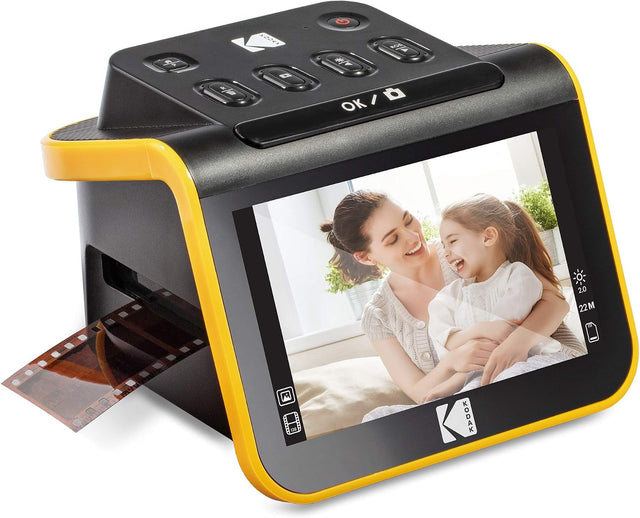
KODAK Slide N Scan RODFS50 / 5-inch / Black-Yellow / SCANNER / one unit
Digitize supported negatives and mounted slides.
Keep in mind: Separate SD card; position and capture each frame.
View on Amazon: KODAK Slide N Scan RODFS50 / 5-inch / Black-Yellow / SCANNER / one unit (opens in a new tab)Choose the item from this guide